


Running a Shopify store means answering the same customer questions over and over again. “What is your return policy?” “How long does shipping take?” “Do you offer free exchanges?” Every unanswered question is a missed sale or an unnecessary support ticket.
In eCommerce, self-service support is no longer optional. Customers expect real-time answers before they buy and if they do not get them, they leave. StoreFAQ is an AI-powered FAQ app for Shopify that helps you build a complete self-service support system without writing a single word from scratch.
In this guide, you will learn how to use StoreFAQ to reduce support tickets on Shopify, improve your Shopify customer experience, and create a real-time FAQ system that works around the clock.
TL;DR: (Too Long, Didn’t Read? )
Here is a quick summary of what you will find in this blog.
| Category | What It Covers | Key Takeaway |
| What is StoreFAQ | An AI-powered FAQ app for Shopify merchants of all store sizes | Automates FAQ creation, management and publishing without coding |
| Who It Is For | New Shopify sellers, scaling DTC brands, and high-volume stores drowning in support tickets | Works for any niche: apparel, electronics, beauty, home goods and more |
| Core AI Capability | Generates contextual FAQ questions and answers based on your store’s products and policies | Cuts content creation time from hours to minutes |
| SEO Value | Structured FAQ schema markup makes your content eligible for Google rich results | Targets long-tail, question-based search queries that drive qualified organic traffic |
| Where FAQs Appear | Product pages, dedicated FAQ page, homepage sections, or any custom Shopify page | Meets customers at every stage of the buying journey |
| Customization Depth | Accordion layouts, category grouping, brand colors, fonts, and embed placement | No developer needed; fully manageable from the app dashboard |
| Customer Support Impact | Reduces repetitive pre-purchase and post-purchase inquiries at scale | Frees your support team for complex, high-value interactions |
| Setup Complexity | Beginner-friendly onboarding with AI-assisted content drafting | From install to published FAQ page in under 30 minutes |
| Content Strategy Fit | Complements product descriptions, policy pages, and blog content | Strengthens topical authority and internal linking across your Shopify store |
| Best Time To Set Up | Before your first major traffic spike, sale, or product launch | Proactive FAQ setup prevents support overload before it starts |
Why Your Shopify Store Needs an AI FAQ App?
This section explains the real business problem that makes a Shopify AI FAQ app essential for modern eCommerce stores. Self-service support is one of the biggest customer experience gaps on Shopify and customer support is one of the highest operational costs for eCommerce businesses. 88% of online shoppers say that a bad customer experience makes them less likely to return. A large part of that experience comes down to how quickly and clearly their questions get answered.
Most Shopify store owners handle customer questions manually. They reply to emails, respond to chat messages and repeat the same answers hundreds of times per week. This is time-consuming, inefficient, and expensive.
A well-structured FAQ page with automation features solves this problem. It gives customers instant access to the answers they need, at any time of day, without much intervention from a human response. It helps reduce customer emails on Shopify as it automates support with FAQs.
However, writing a complete FAQ page from scratch is still a challenge. You need to figure out which questions to include, write clear answers, organize everything logically and keep the page updated as your store evolves. That is exactly where you need an AI FAQ app to ease the process of creating FAQs. These apps use AI to handle the heavy lifting so you can focus on growing your store.
Meet StoreFAQ: The AI FAQ Generator App for Shopify
StoreFAQ is a smart, easy-to-use Shopify FAQ generator that lets you create, manage and publish professional FAQ pages with the help of artificial intelligence.
Unlike basic FAQ builders that just give you a blank text editor, StoreFAQ uses artificial intelligence to generate relevant questions and answers for your specific store, along with helpdesk automation features like Instant Answer, Live Chat, etc.
The app understands your store’s context. It can pull insights from your product catalog, store policies and industry type to suggest FAQs that your actual customers are likely asking. This makes the content feel natural, accurate, and genuinely useful.
Here is what makes StoreFAQ stand out from a generic Shopify FAQ generator:
- The AI generates FAQ content automatically based on your store’s context
- You can organize FAQs into categories for a cleaner browsing experience
- The FAQ widget embeds directly into product pages or a standalone FAQ page
- The structured format supports FAQ schema markup, which helps with Google SEO
- The multilingual FAQ feature allows the creation of FAQs in different languages
- No technical knowledge or coding is required to get started
Step-by-Step Guide to Using StoreFAQ AI FAQ Generator App
Now that you know the benefits of creating FAQs with AI, it is time to see how StoreFAQ works and how it helps to generate AI-powered FAQ in minutes. So, let us walk you through the complete process of setting up and using StoreFAQ to generate FAQ with AI.
Step 1: Install StoreFAQ from the Shopify App Store
Open the Shopify App Store and search for “StoreFAQ.” Click the app listing and hit “Install.” Grant the necessary permissions to proceed. Once installed, StoreFAQ appears in your Shopify admin.
After installation, click on StoreFAQ in your apps list. You will land on the main dashboard. From here, you can see all your existing FAQ groups and manage necessary settings.
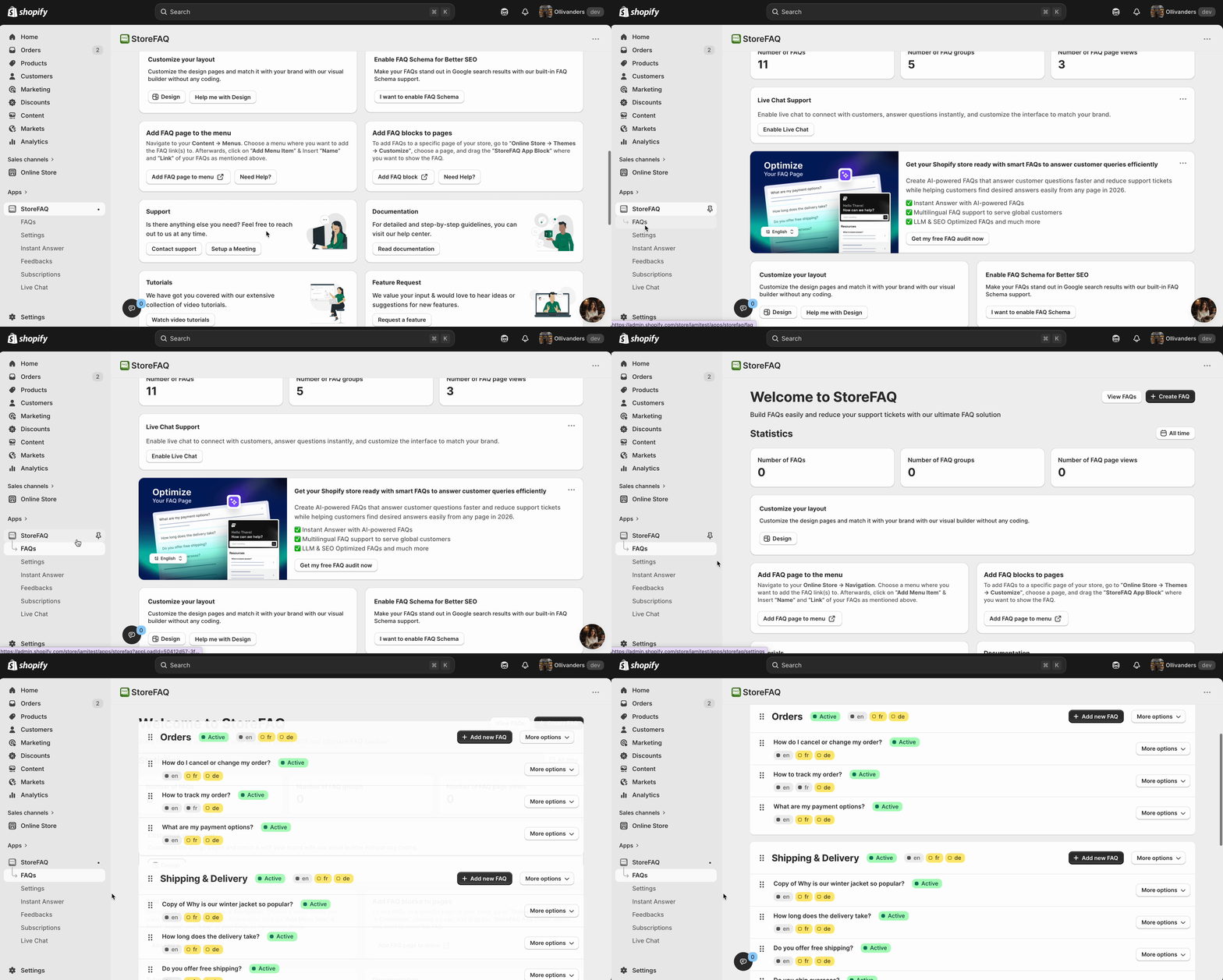
The user experience is clean and intuitive. Everything you need is visible in the app’s admin dashboard.
Step 2: Create a New FAQ Group
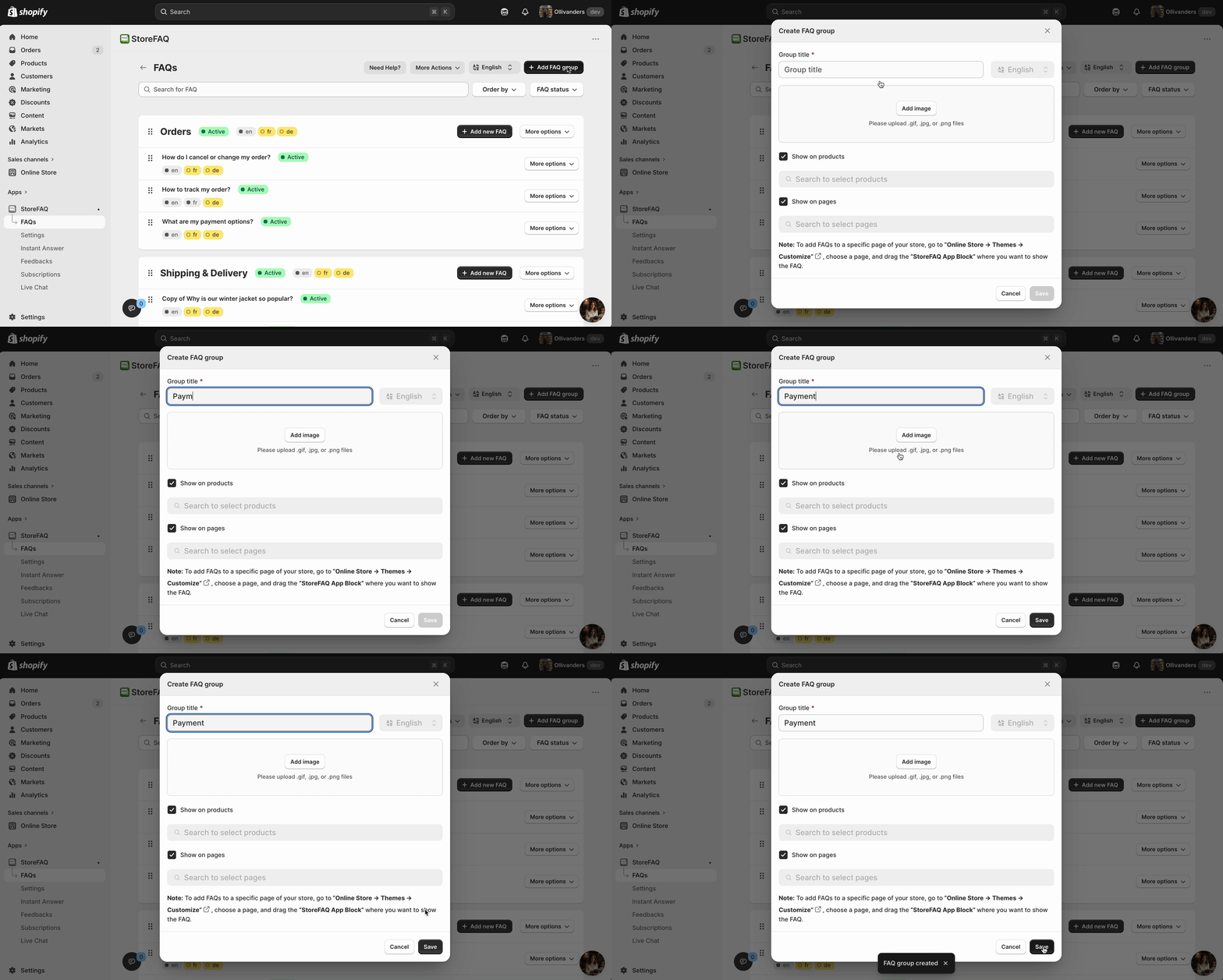
Click the button to create a new FAQ group. A group is essentially a category or a collection of related FAQs. For example, you might create groups like:
- Shipping and Delivery
- Returns and Refunds
- Product Information
- Payment and Security
Click on ‘+Add FAQ Group’ and give your group a clear name. You can add an image for the FAQ group and select where to show the FAQs. This helps both your customers and the AI understand the context.
Step 3: Use AI to Generate FAQ Answers
After you are done creating the FAQ group, create FAQs. Click on ‘Add New FAQ’ for that.
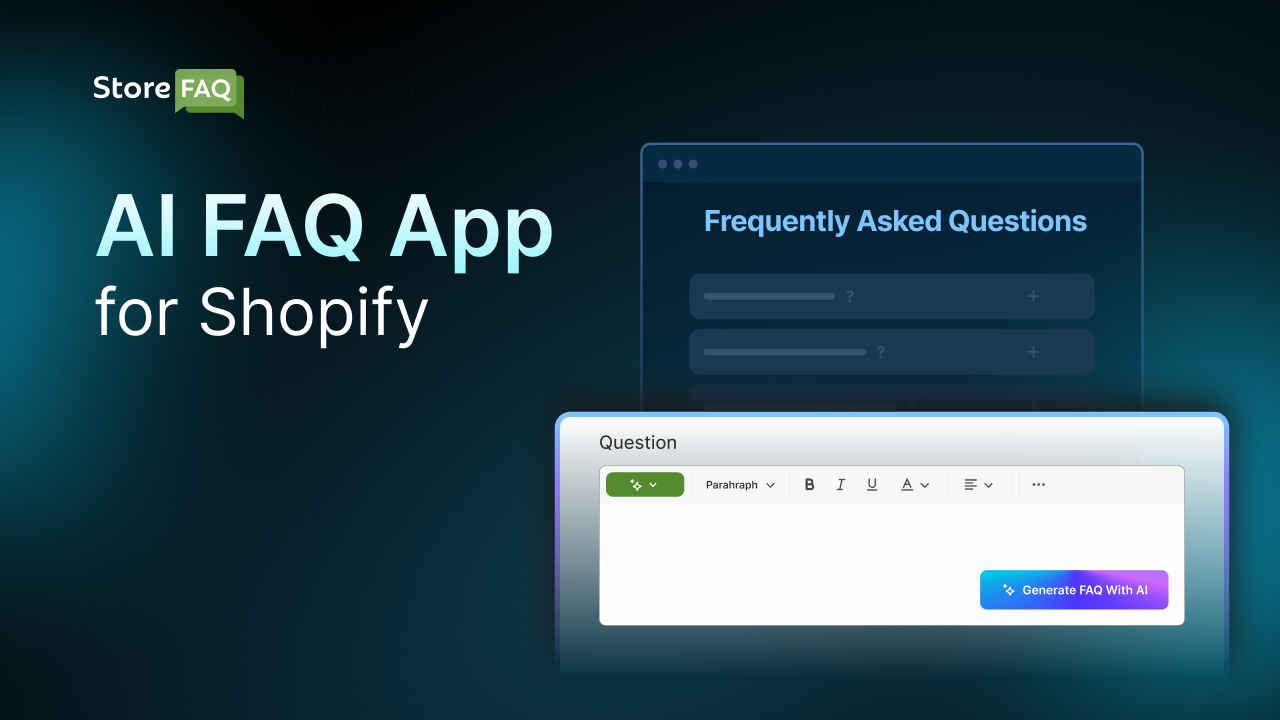
We will now use the ‘AI Autowrite’ feature to generate FAQs. So, proceed to create a new FAQ. Add the FAQ question, and click on the ‘Generate With AI’ button with the AI Icon. A prompt interface will appear where you can provide the keyword and context for the FAQ. Now, click on the ‘Generate’ button.
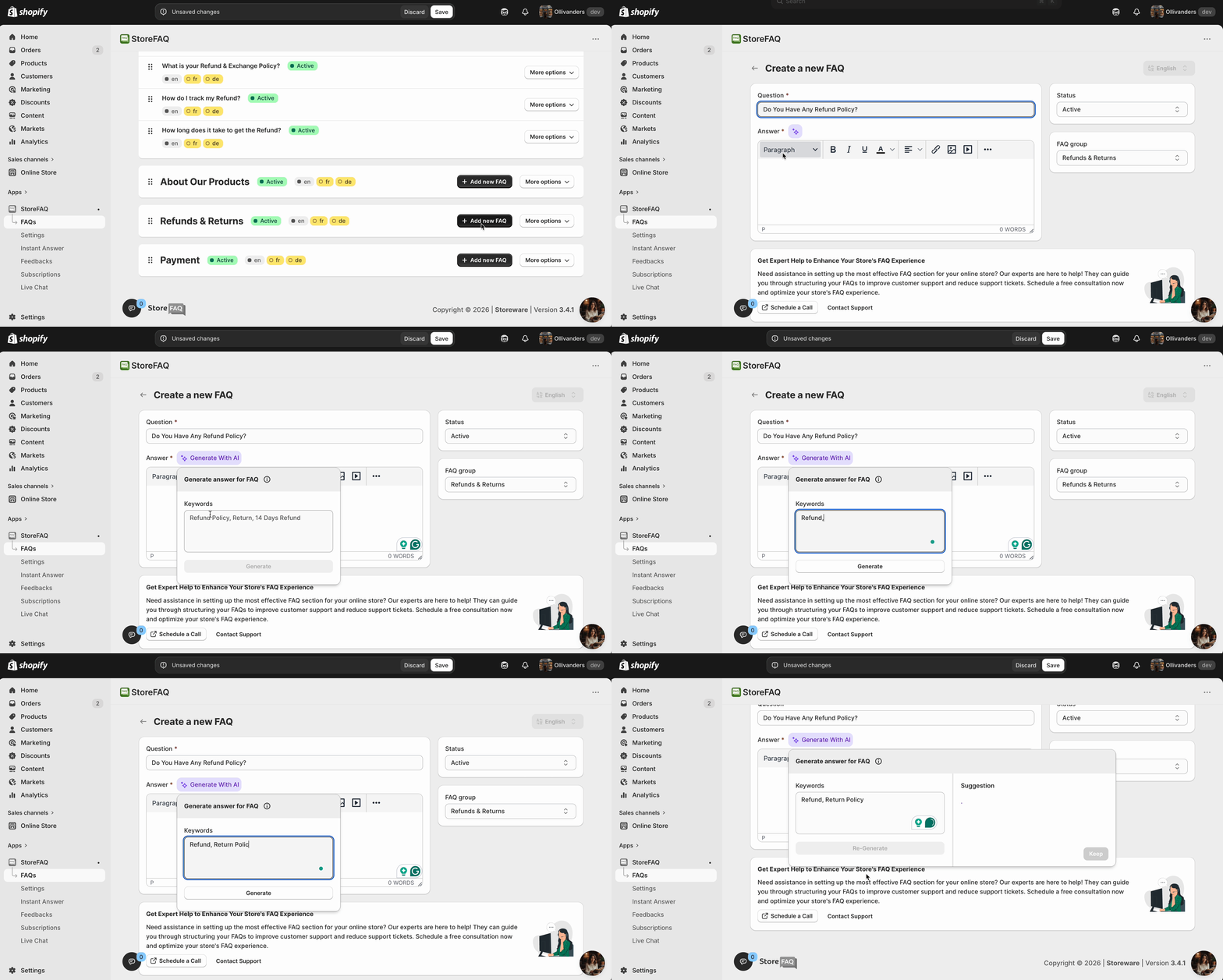
The AI will use this input to generate answers. Within seconds, you will see a complete FAQ draft appear on the screen.
Go through each question and answer the AI-generated. Most of the content will be accurate and usable, but you should review it to make sure everything aligns with your actual policies.
Edit any answers that need adjustments. Delete anything that does not apply to your store. This review step is important because it ensures your FAQ page reflects accurate, store-specific information rather than generic content.
After publishing, monitor your Shopify store’s support ticket volume. StoreFAQ lets you display your FAQ in multiple locations. The most common options are:
- A dedicated FAQ page accessible from your navigation menu
- Embedded on specific product pages to answer product-related questions
- On your homepage or any custom page using the app’s widget
To add the FAQ to a specific page, follow the step-by-step guide.
Key Benefits of Using StoreFAQ as Your Shopify FAQ Generator
This section summarizes the business and practical advantages of using StoreFAQ, helping readers understand the return on investment.
- Saves Time with AI Content Generation: Writing FAQs manually can take hours. StoreFAQ’s AI reduces that time to minutes. You get a full draft instantly and you only spend time reviewing and refining.
- Reduces Customer Support Workload: When customers can find answers on their own, they do not need to email or chat with your support team. This frees up your team to handle more complex issues that genuinely need a human touch.
- Improves the Shopping Experience: Shoppers who get quick answers are more confident in making a purchase. A clear, accessible FAQ page reduces hesitation and can directly improve your conversion rate.
- No Coding Required: StoreFAQ is designed for merchants, not developers. You do not need to know HTML, CSS, or JavaScript to create a professional FAQ page. The app handles all of that in the background.
- Fully Customizable for Your Brand: The app lets you match the FAQ design to your store’s visual identity. Your FAQ page will feel like a natural part of your store, not a generic add-on.
Improved SEO with Structured FAQ Content
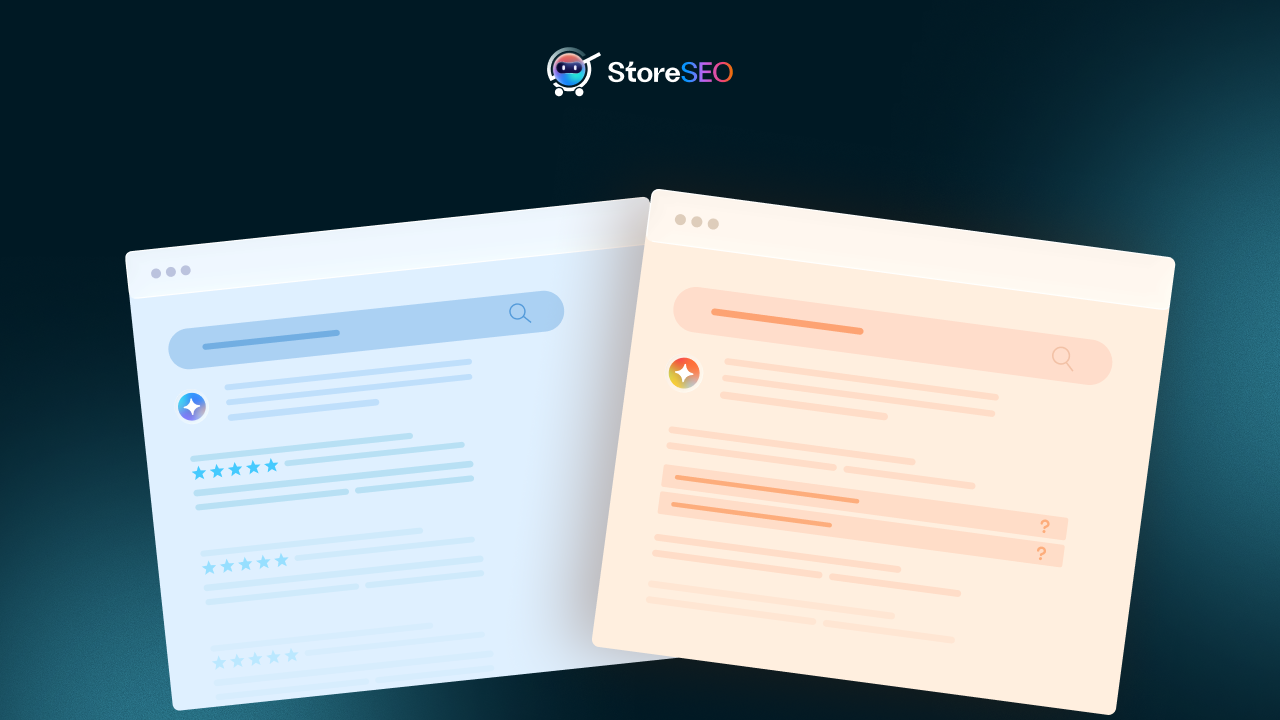
FAQ pages with schema markup can appear as rich results in Google search. This gives your store additional search visibility beyond your regular product and collection pages. Search engine optimization is not just about keywords on product pages. Your FAQ content can become a powerful SEO asset when structured correctly.
When you create FAQ content with StoreFAQ and enable schema markup, Google can display your questions and answers directly in search results. These are called “rich results” or “rich snippets.” They appear beneath your regular search listing and give users a preview of your FAQ content before they even click.
This has two major benefits. First, it increases the chances of your result catching a user’s eye in a competitive search results page. Second, it can drive more qualified traffic to your store because users see upfront that your page answers their specific question.
Beyond rich snippets, FAQ pages also help with long-tail keyword targeting. Long-tail keywords are specific, question-based search phrases like “how long does shipping take from [your country]” or “can I return a used product.” These are the kinds of questions your FAQ page naturally answers, and they are the kinds of searches your potential customers are actually making.
According to Ahrefs, long-tail keywords make up the majority of all search queries. A well-structured FAQ page targeting these queries can attract a steady stream of organic search traffic to your store over time.
StoreFAQ makes all of this achievable without requiring any technical SEO knowledge.
Best Practices for Creating High-Converting Shopify FAQ Pages
This section gives actionable advice to help merchants get the most out of their FAQ pages, both for user experience and SEO. A great FAQ page does more than just list questions. It builds trust, reduces friction, and supports your overall marketing strategy. Here are the best practices to follow.
- Write for your real customers, not yourself: Use language your customers actually use. If they ask, “When will my order arrive?” do not title the question “What are your delivery timeframes?” Match the natural language of your audience.
- Keep answers concise but complete: A good FAQ answer should be direct. Provide the essential information first, then add details if needed. Do not pad answers with unnecessary text.
- Update your FAQ regularly: As your policies change, your products evolve, or new common questions emerge, update your FAQ content. Outdated information is worse than no information because it creates distrust.
- Link to relevant pages within answers: If your FAQ answer mentions your return policy, link to the full return policy page. If it mentions a specific product, link to that product. Internal linking helps both the user experience and your SEO.
- Organize with categories: A long, unstructured list of questions is overwhelming. Group related questions under clear category headings so customers can jump straight to the section relevant to them.
- Place FAQs where decisions happen: Adding product-specific FAQs directly on product pages can have a direct impact on conversions. Customers who have their questions answered at the point of purchase are more likely to buy.
Common Mistakes To Avoid When Setting Up Your Shopify FAQ Page
This section helps merchants avoid the pitfalls that reduce the effectiveness of their FAQ pages.
Even with a powerful tool like StoreFAQ, there are a few common mistakes that can undermine your FAQ page’s performance.
- Publishing AI content without reviewing it: The AI is a powerful drafting tool, but it is not perfect. Always review generated content before publishing. Make sure every answer accurately reflects your actual store policies.
- Ignoring mobile experience: A large portion of Shopify traffic comes from mobile devices. Preview your FAQ page on a mobile screen before publishing. Make sure the accordion layout works smoothly and text is readable on small screens.
- Using vague question phrasing: Questions like “What about shipping?” are too vague. Be specific: “How long does standard shipping take within the United States?” Specificity makes your FAQs more useful and more searchable.
- Not including a FAQ link in your navigation: If customers cannot find your FAQ page, it does not help them. Add the FAQ page to your header or footer navigation so it is always accessible.
- Creating a FAQ page and forgetting it: Customer questions evolve. Your store changes. Your FAQ page should evolve too. Set a reminder to review and update your FAQ content at least once a quarter.
Reduce Support Tickets on Your Shopify Store with the Right AI FAQ App
Every unanswered customer question costs your Shopify store something. It costs time when your support team has to respond manually. It costs money when those responses require a paid helpdesk tool or a full-time agent. And it costs revenue when a shopper leaves your store without buying because they could not find the answer they needed.
StoreFAQ addresses all three of those costs in one place. It gives you a structured, AI-powered self-service support system that works around the clock, requires no coding to set up, and takes minutes rather than days to build. You get a real-time FAQ page that answers common customer questions, reduces support ticket volume, improves the Shopify customer experience, and earns SEO visibility through FAQ schema markup.
A Shopify store without a proper FAQ page sends customers to your inbox. A store with StoreFAQ sends customers to the answers they need, instantly, on any page where they are most likely to need them.
If reducing support tickets on Shopify is a priority for your store this year, StoreFAQ is one of the most direct and cost-effective tools to make that happen. Install it, use the AI to generate your first FAQ group, and publish your page today. The results will show up in your support ticket volume before the end of the week.
Wrapping up for today! If this blog helped you, please subscribe for more simple guides, tutorials, and tips to grow your Shopify store.