


Most Shopify stores lose sales for a simple reason. Unanswered questions. Customers hesitate over sizing, shipping, returns or product details. If they do not find answers instantly, they leave instead of asking. That is where product FAQs make a real impact.
But writing effective FAQs is not easy. Guessing what customers might ask often leads to generic answers that do not convert. Well, AI makes it quite easy now.
With a Shopify AI FAQ builder, you can generate smart, relevant questions based on real data and customer intent. You save time, reduce support queries and guide shoppers toward confident purchase decisions. In this guide, you will learn how to create product FAQs with AI and how to turn them into a conversion asset for your store.
TL;DR (Too Long, Didn’t Read?)
A Shopify AI FAQ builder is a tool that uses artificial intelligence to automatically write FAQ questions and answers for your product pages or store. Instead of writing each FAQ manually, the AI reads your product details and keyword inputs to generate ready-to-publish FAQ content within seconds.
It saves time, reduces support tickets and improves the overall shopping experience for your customers.
A quick summary of everything this guide covers:
| Topic | What You Will Learn |
| What is a Shopify AI FAQ builder | How AI tools generate product FAQs automatically |
| Why FAQs matter for Shopify stores | Impact on SEO, conversions and customer support |
| Best AI FAQ tool for Shopify | StoreFAQ and its AI Autowrite feature |
| Step-by-step setup guide | How to connect OpenAI and generate FAQs with AI |
| SEO benefits of AI-generated FAQs | How FAQ schema improves Google rankings |
| Common mistakes to avoid | Tips for quality and accuracy in AI FAQ content |
Shopify Product FAQ Page: Why Your Shopify Store Needs One?
Before diving into the how, let us talk about the why. If your Shopify store does not have a dedicated FAQ section on your product pages, you are likely losing customers every single day.
Think about it from a shopper’s perspective. A buyer lands on your product page. They have questions about shipping, sizing, materials or return policies. If those answers are not right there on the page, they leave. They might go to a competitor who has the answers readily available.
Product FAQs solve this problem directly. They keep shoppers on your page longer, build trust instantly and give them the confidence to click ‘Add to Cart.’ FAQ pages are one of the most commonly visited sections of a website because users are always looking for fast, specific answers.
Here is what a well-built Shopify FAQ page or section does for your store:
- Reduces support tickets: Shoppers find answers themselves without emailing or messaging your team.
- Increases conversion rates: Answering objections on the product page removes hesitation at the point of purchase.
- Boosts SEO performance: FAQ content targets long-tail search queries and can appear in Google’s featured snippets.
- Builds brand trust: A detailed FAQ signals professionalism and transparency to potential buyers.
- Improves customer experience: Shoppers feel informed, supported and confident before buying.
The problem most Shopify merchants face is time. Writing FAQs for dozens or hundreds of products is exhausting and repetitive. That is exactly why AI FAQ generation for Shopify has become so valuable in 2026.
What Is a Shopify AI FAQ Builder?
A Shopify AI FAQ builder is a tool or application that uses artificial intelligence, typically powered by large language models like OpenAI’s GPT, to automatically write frequently asked questions and their answers for your Shopify store.
Instead of starting from scratch for every product, you provide a few keywords or product details, and the AI generates a complete set of FAQ questions and answers for you. The output is professional, relevant and ready to publish with minimal editing.
The best AI FAQ generator for Shopify integrates directly into your Shopify admin dashboard. This means you do not need to leave your store, copy-paste content between platforms or hire a copywriter for your FAQs. AI-powered FAQ generation for Shopify works particularly well for:
- Product-specific FAQs covering ingredients, dimensions, compatibility or care instructions
- Shipping and delivery FAQs for your general store policies
- Return and refund FAQs to handle post-purchase queries
- Technical product FAQs for gadgets, tools or software products
- Category-level FAQs that apply to entire collections
The real advantage is speed. What would take a human writer several hours to research and write can be done by an AI FAQ writing tool for Shopify in a matter of seconds.
Introducing StoreFAQ: The Best AI FAQ App for Shopify
StoreFAQ is a powerful AI-powered Shopify FAQ builder app that gives merchants everything they need to build, design and manage FAQ pages directly from their Shopify admin. It is built specifically for Shopify stores and comes with a standout feature that makes it the top choice for modern merchants: AI Autowrite.
The AI Autowrite feature inside StoreFAQ is what makes it the leading Shopify AI FAQ builder available today. With this feature, you can generate product FAQs with AI in just a few clicks using your OpenAI API key. No technical knowledge is required and the results are high-quality, publishable FAQ content.
Here is what makes StoreFAQ stand out from other FAQ apps on Shopify:
- AI-powered FAQ generation using OpenAI’s language models
- Drag-and-drop FAQ builder for easy content organization
- FAQ schema support to improve SEO and Google rankings
- Multilingual FAQ support for global Shopify stores
- Instant Answer feature to surface FAQs anywhere on the store
- Live Chat integration for real-time customer support
- Custom CSS and visual design builder for brand-matching FAQ pages
- Import and export FAQs to easily migrate between stores
- Embed FAQs on any page, including product pages, collection pages and custom pages
- Free plan available with paid plans starting at $7.99 per month
How to Create Product FAQs with AI Using StoreFAQ (Step-by-Step Guide)
Now, let us get into the practical part. Here is a complete step-by-step Shopify AI FAQ setup guide using the StoreFAQ app and its AI Autowrite feature.
How to Generate FAQs using Shopify Product FAQ Page on StoreFAQ?
Create high-quality FAQs in seconds with AI Autowrite in StoreFAQ. This feature helps you generate relevant, well-structured answers based on your store content, so you can reduce manual effort and keep your FAQ section clear, helpful and up to date.
First, you have to install the StoreFAQ Shopify app. So, find and install the app from the ‘Apps’ option in your Shopify admin dashboard. Then, follow these steps:
How to Generate FAQs using AI Autowrite on StoreFAQ?
In this documentation, we will show you how to generate FAQs using AI Autowrite on StoreFAQ.
Step-01: Create FAQ Group & Write FAQs
First, from the Shopify dashboard StoreFAQ → FAQs, Tap ‘+ Add FAQ group’. After creating an FAQ group.
Note: Check out this document for creating a FAQ group.
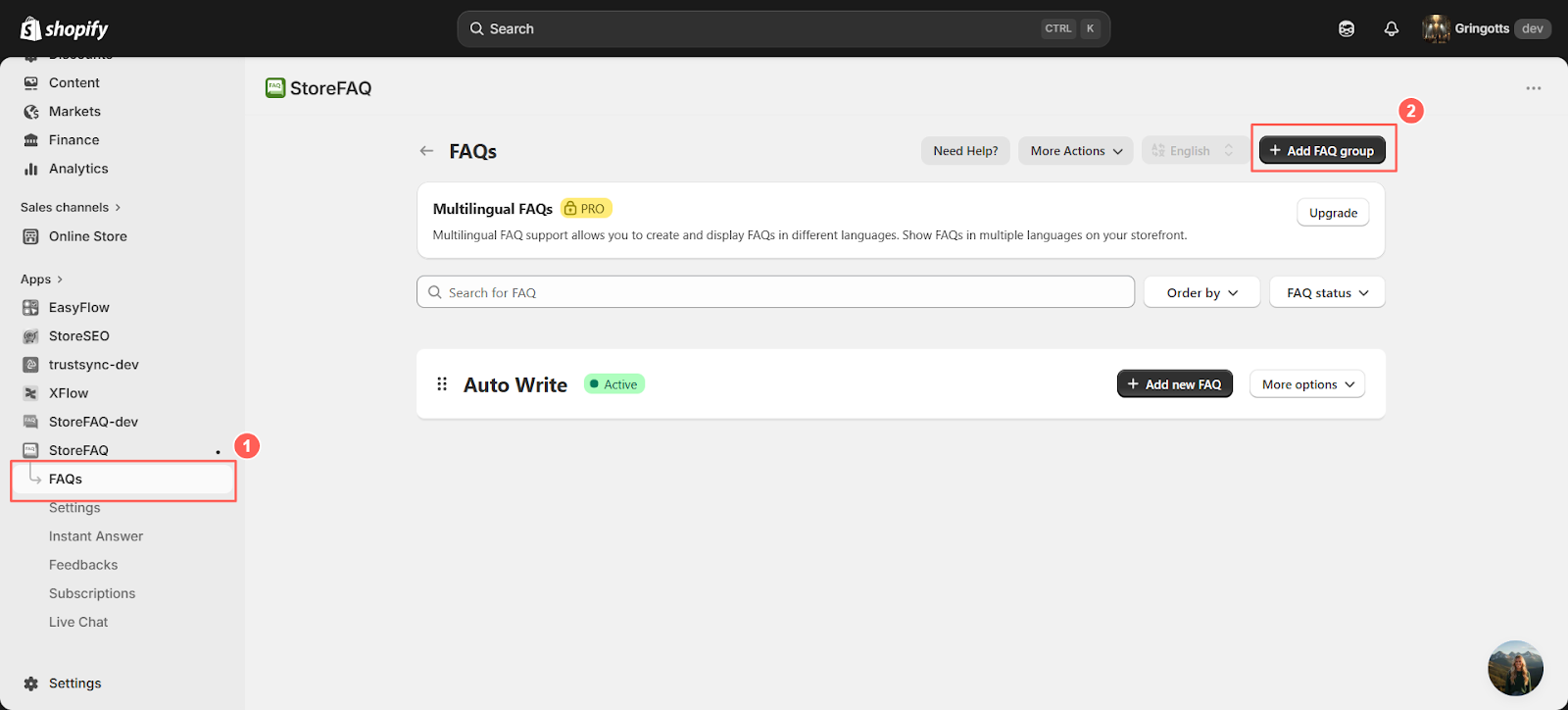
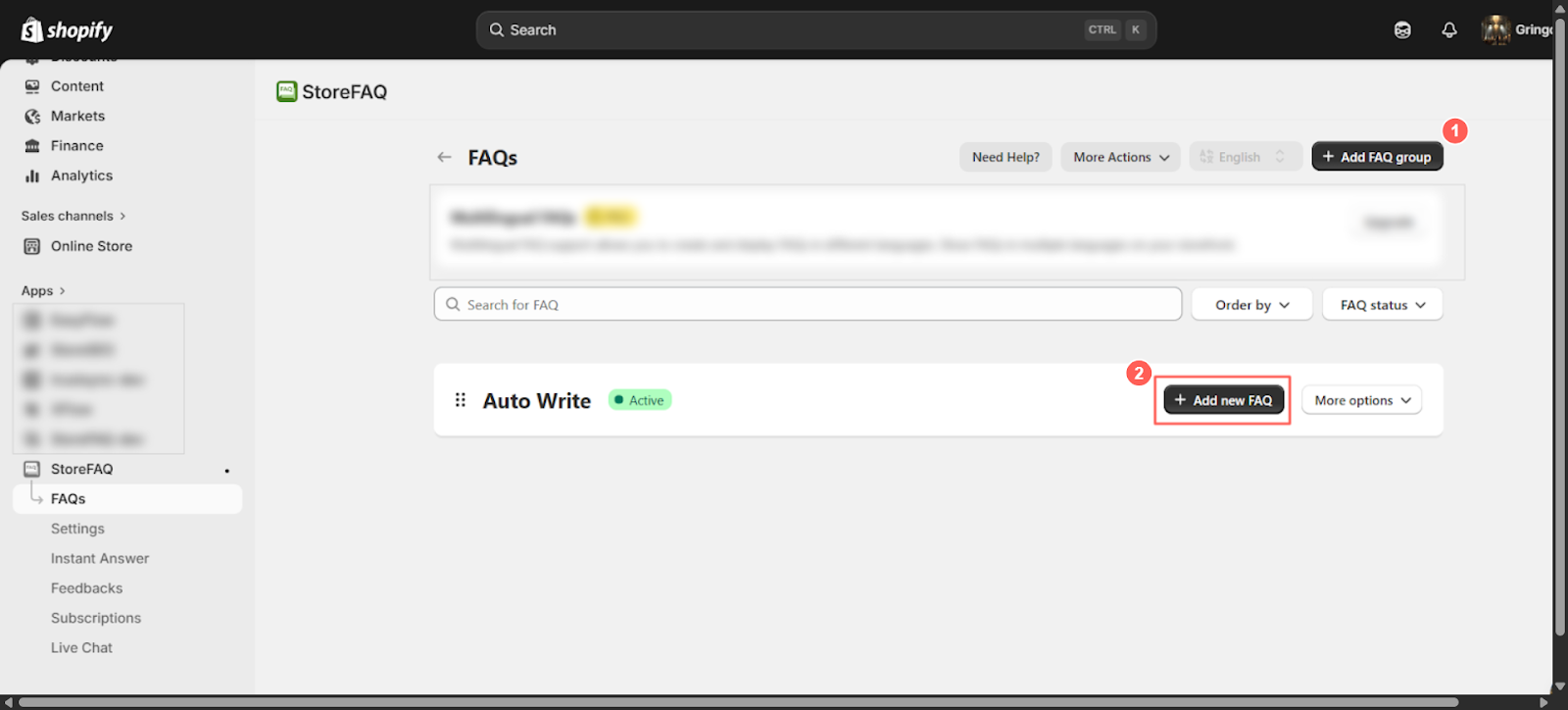
Click “+ Add New FAQ” under the selected group to open the FAQ editor. This will take you to a dedicated interface where you can start creating your question and answer content. From there, you can enter the FAQ title, write a clear response and organize it within the group so it appears correctly on your store.
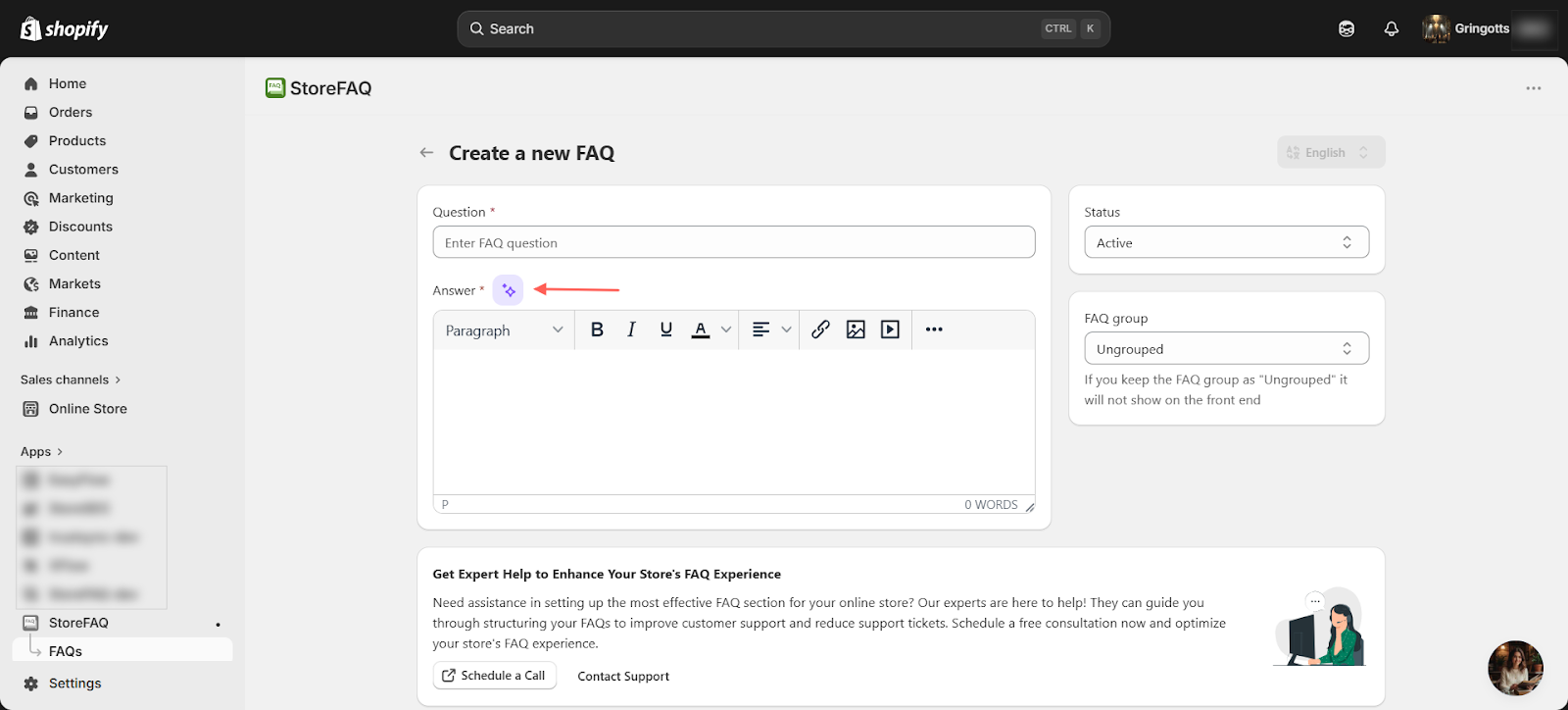
Then you will see an editor similar to the one shown below. In the editor, look for the sparkle icon and click on it to access the AI writing option available there.
Step-02: Add Your API Key
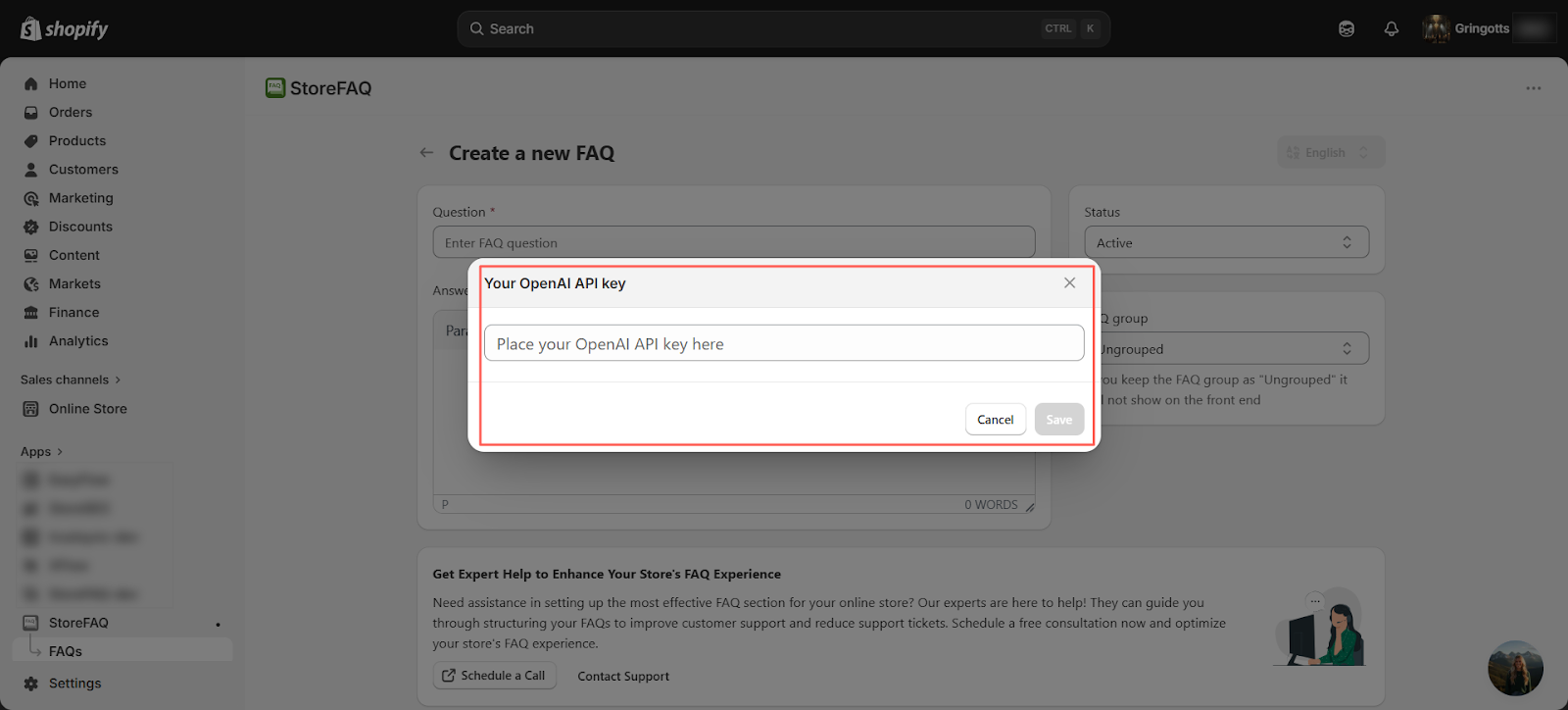
Now, enter your API key to generate FAQs with AI and click ‘Save’. You can paste your API key directly into the provided field, which allows the system to connect securely and start creating AI-powered FAQ content for your store.
Optional
You can also set up your API key from the settings. Go to StoreFAQ → Settings and open the Autowrite section. In the input field, paste your OpenAI API key to connect the service. For step-by-step guidance on how to obtain your OpenAI API key, refer to the attached documentation.
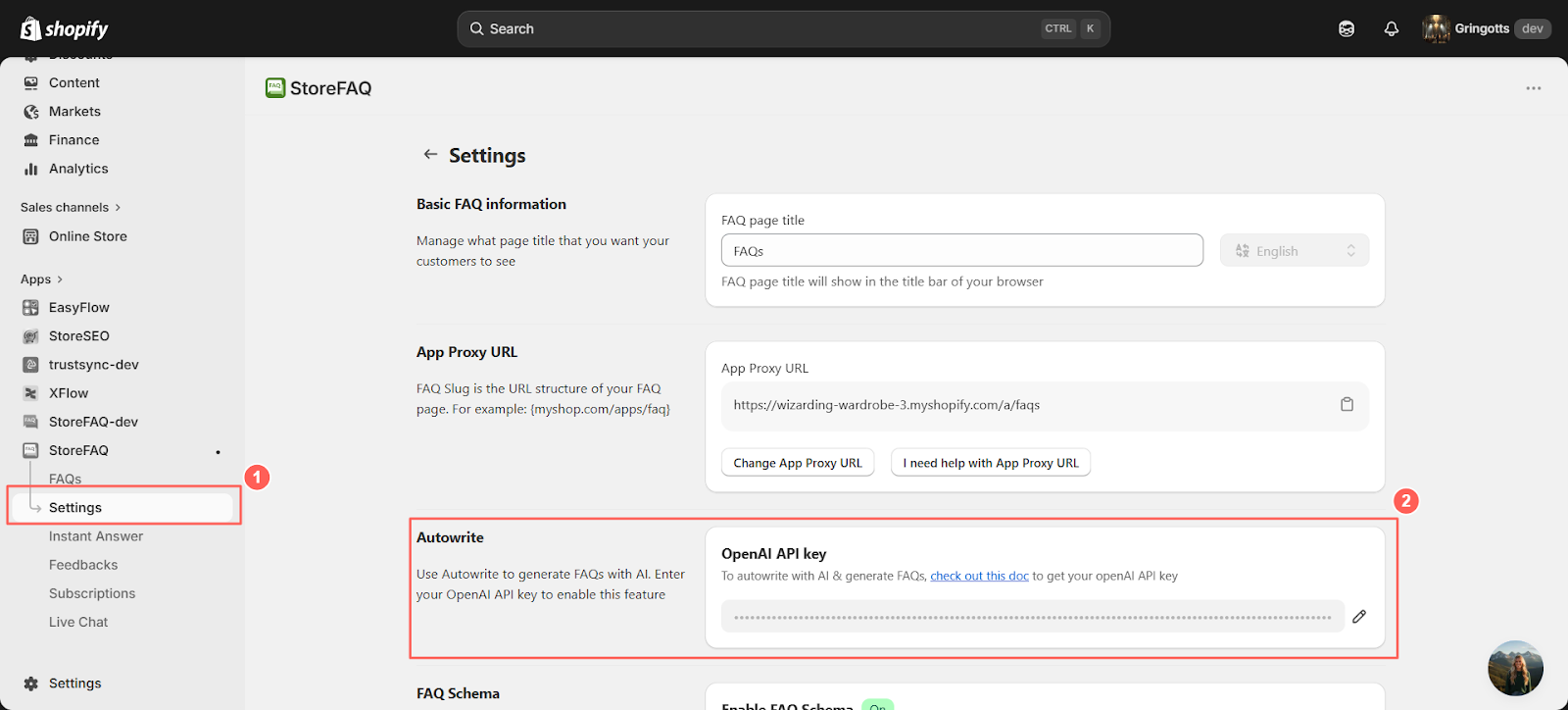
After configuring your API, return to the ‘Create FAQ’ section to continue building your FAQs with AI support. From there, you can proceed with generating or editing your FAQ content as needed.
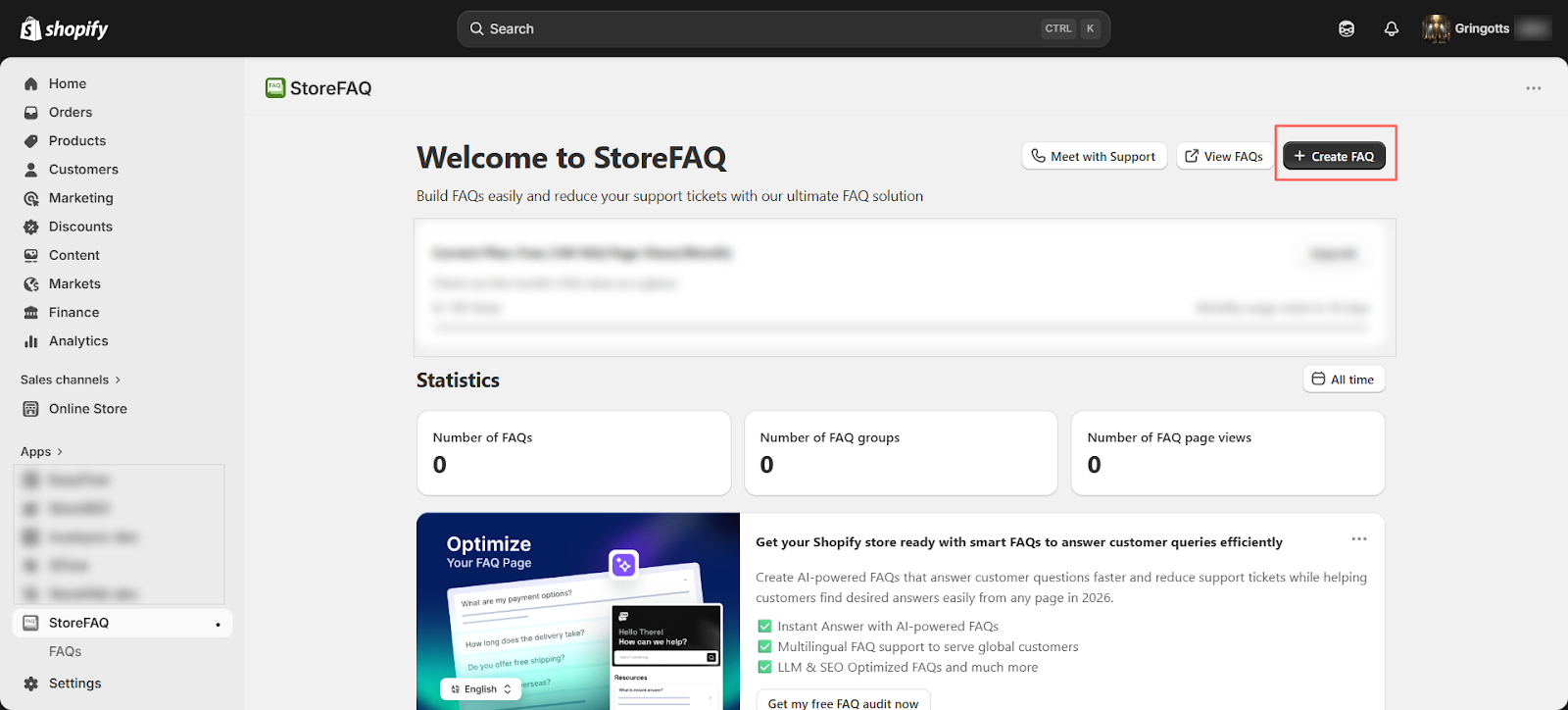
Step-03: Write FAQ with AI
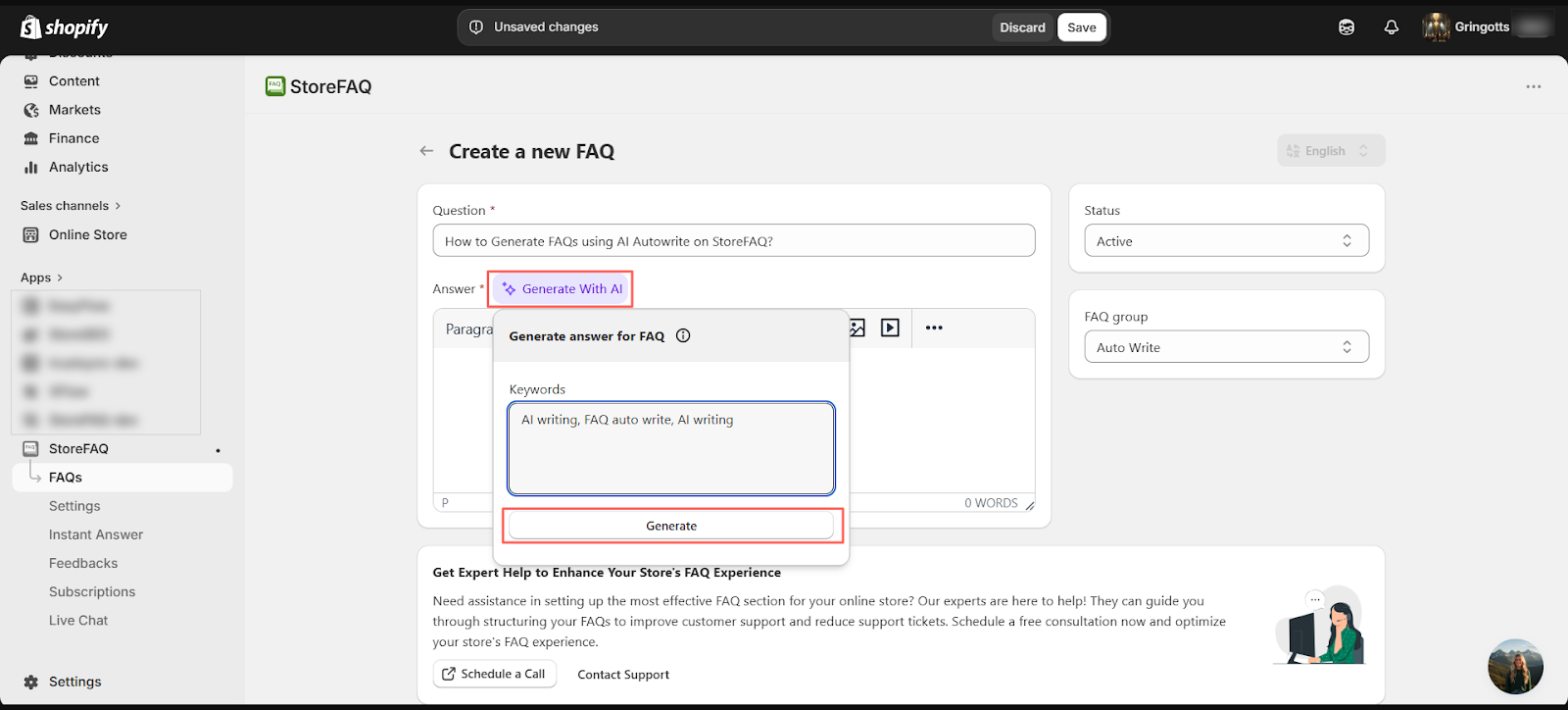
Then click ‘Generate with AI’. A prompt will appear where you can enter relevant keywords for your FAQ. After adding the keywords, click ‘Generate’ to let the AI create suggested questions and answers based on your input.
Based on your entered keywords, you will receive AI-generated suggestions for FAQs. Review the results carefully and decide if they match your intended flow and content structure. If the suggestions fit well, you can keep them as they are. If not, you can regenerate again until you get a more relevant set of FAQs.
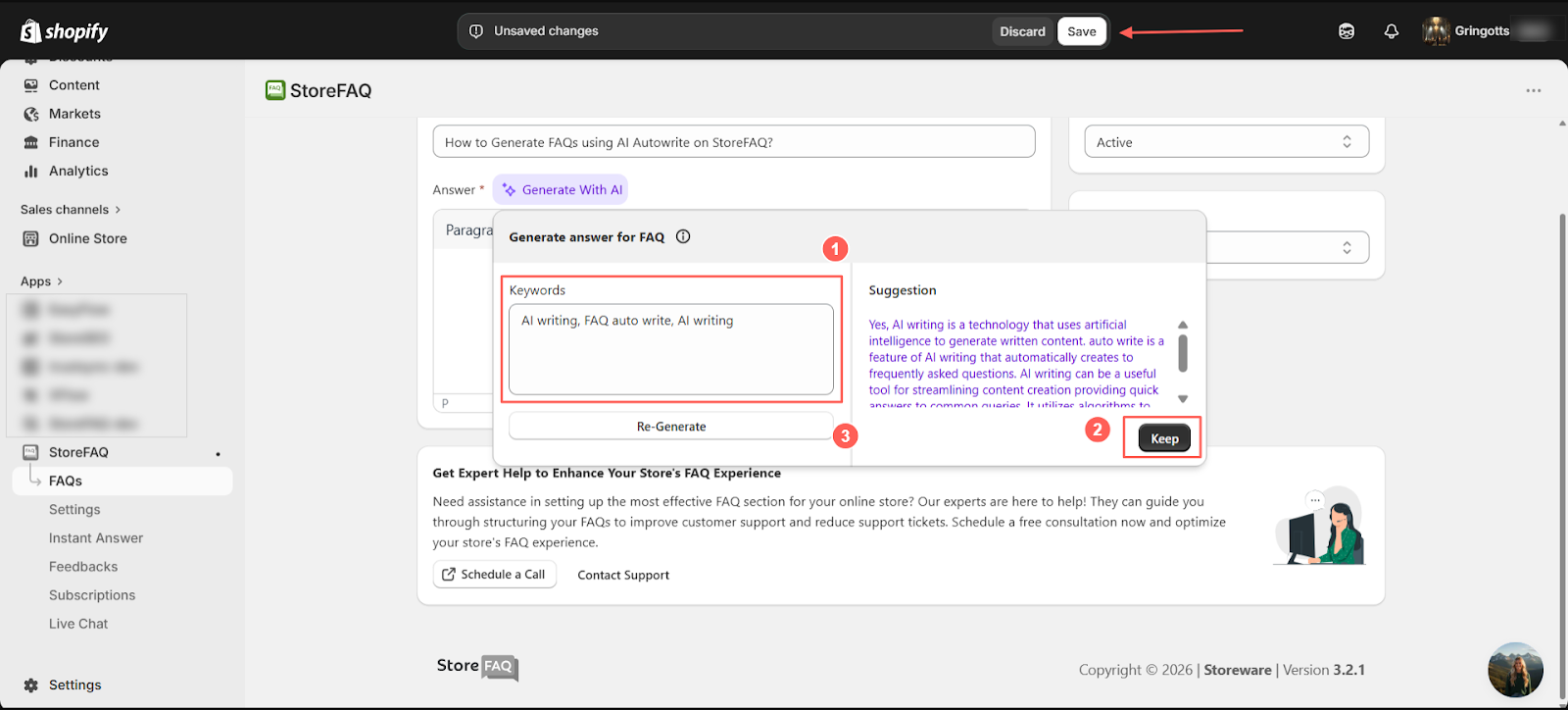
Once you finish writing or generating your FAQ content, click ‘Save’ to publish it on your site. After saving, your FAQ will be live and available for your visitors to view.
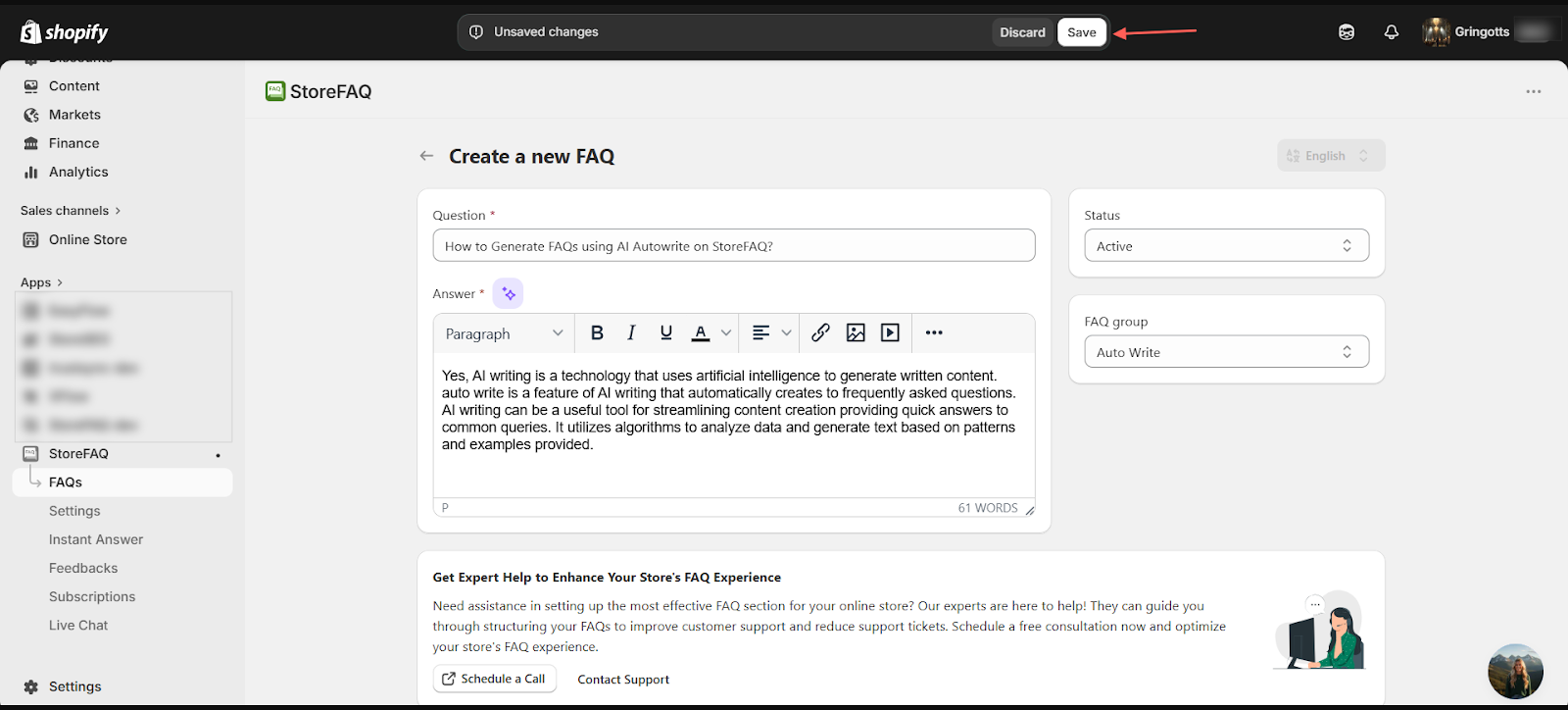
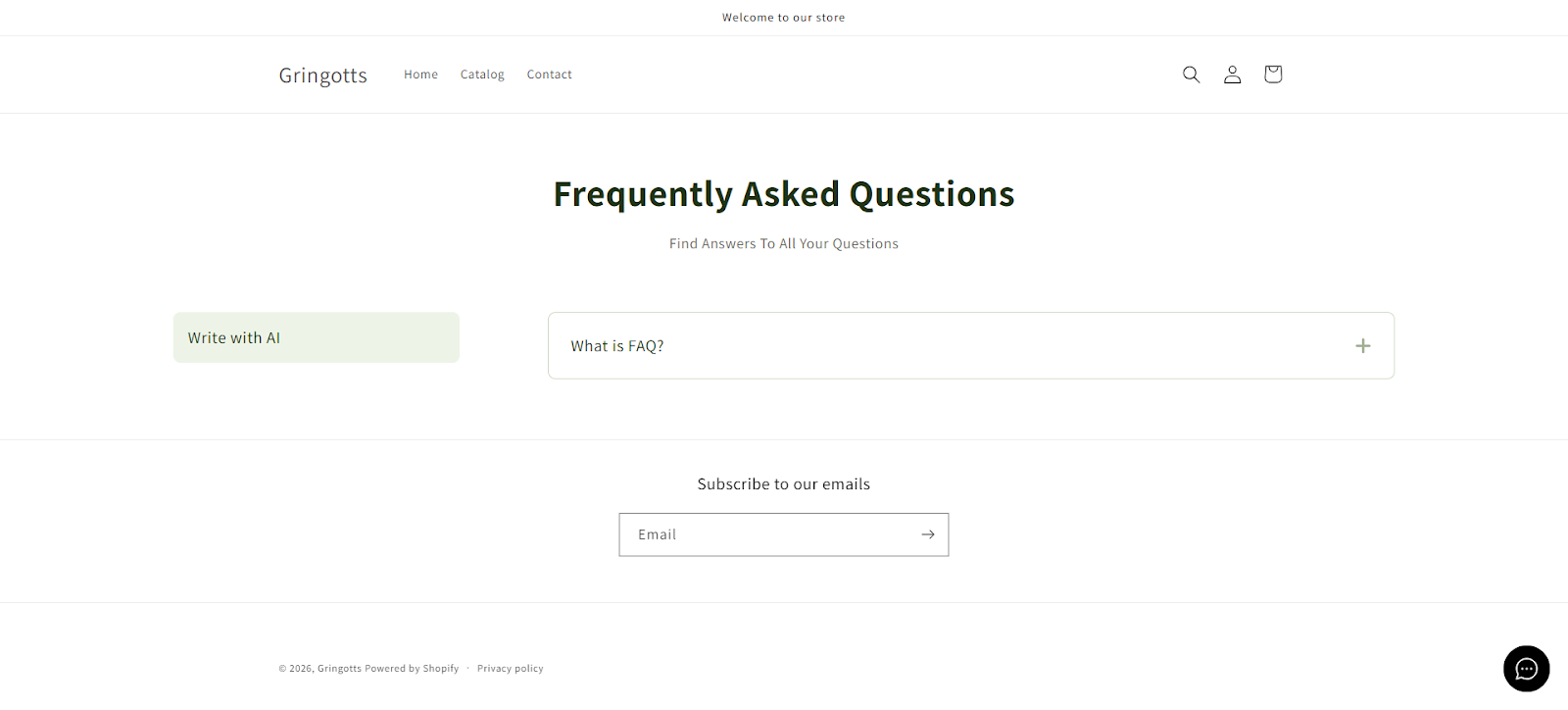
Final Outcome
This is how you can create FAQs in just a few minutes using AI. With a simple setup and a few inputs, you can quickly generate clear and structured questions and answers without manual effort, making the entire FAQ creation process faster and more efficient.
Key Benefits of Using an AI FAQ Generator for Your Shopify Store
Using a Shopify FAQ automation feature like StoreFAQ does not just save time. It creates real, measurable improvements across your entire store experience.
Saves Hours of Manual Writing Time
Writing FAQs manually for every product is time-consuming. With an AI-powered FAQ generator for Shopify, you can produce a full set of FAQ content in under a minute per product. For stores with large catalogs, this is a massive time-saver.
Improves Product Page SEO
Product page FAQs are one of the most underutilized SEO features for Shopify merchants. When you add FAQ schema markup to your FAQ content, Google can pull those questions and answers directly into search results as rich snippets. This improves your click-through rate and drives more organic traffic.
StoreFAQ & StoreSEO includes built-in FAQ schema support, which means you do not have to manually add any code. It is all handled automatically by the app.
According to Google’s Search Central documentation, FAQ schema is a supported rich result type that can significantly improve how your pages appear in search results.
Reduces Customer Support Workload
Every question your FAQ page answers is one fewer support ticket your team has to handle. As part of your customer support automation for Shopify, you can utilize FAQs and it is one of the most cost-effective strategies available. Merchants who use StoreFAQ consistently report fewer repetitive support inquiries after publishing detailed FAQ content.
Builds Buyer Confidence And Increases Conversions
When shoppers can find clear answers to their questions without leaving the product page, they are significantly more likely to complete a purchase. FAQs reduce anxiety around buying, especially for new or first-time customers.
Keeps Content Consistent Across Your Store
AI-generated FAQs follow a consistent structure and tone. This is especially important for stores with multiple team members writing content. The AI ensures uniformity across your FAQ pages, making your brand voice feel professional and cohesive.
How AI-Generated FAQs Help You Rank on Google
Shopify store optimization for search engines in 2026 requires more than just great product descriptions. FAQ content has become a critical component of any strong SEO strategy for eCommerce.
Here is how AI FAQ content generation for Shopify directly impacts your Google rankings:
Long-Tail Keyword Targeting
FAQ questions naturally contain long-tail search queries. When someone searches ‘does this yoga mat come with a carrying strap,’ your FAQ page might rank directly for that search.
Featured Snippet Opportunities
Google frequently pulls FAQ content into Position Zero, the answer box at the top of search results. Structured FAQ content with clear questions and answers is exactly what Google is looking for.
Increased Dwell Time
Shoppers who read through FAQ content spend more time on your page. Google interprets longer dwell time as a signal that your page is valuable and relevant.
FAQ Schema Rich Results
With StoreFAQ’s built-in schema support, your FAQs are automatically marked up in structured data format. This makes them eligible for Google’s FAQ rich results in search.
More Indexed Content
Every FAQ you add is additional indexable content on your product page. More content gives Google more context about your page’s topic, which can improve your ranking for related keywords.
Best Practices for Writing FAQs with AI on Shopify
Just because AI can generate FAQs quickly does not mean you should publish everything without review. Here are the best practices to follow when using a Shopify AI FAQ builder:
- Review every generated FAQ before publishing.
- Use specific, product-relevant keywords.
- Keep answers short and direct.
- Group FAQs logically.
- Update FAQs regularly.
- Add FAQs to your highest-traffic product pages first.
- Enable FAQ schema on all your FAQ pages.
Start Building AI-Powered FAQs for Your Shopify Store Today
There has never been a better time to use a Shopify AI FAQ builder to create and optimize your product FAQ content. Every product page without a FAQ is a missed opportunity to answer buyer questions, improve your Google rankings and reduce your support workload.
StoreFAQ makes the entire process simple. Install the app, connect your OpenAI API key, generate your FAQs in seconds and publish them directly to your Shopify product pages. You will see the difference in your support ticket volume, your customer confidence and your store’s SEO performance.
Do not spend another hour manually writing FAQs. Let AI handle the heavy lifting so you can focus on what matters most: growing your Shopify store.
If this blog helped you, please subscribe for more simple guides, tutorials and tips to grow your Shopify store.