


When a customer lands on your Shopify store with a question, you have only seconds before they leave for a competitor. Most online stores solve this by adding an FAQ page, a live chat widget, or a support email address. But these elements may still not be enough, especially when you need instant resolution of customer queries. The customer has to stop, search, click, and wait. Shoppers do not want to wait.
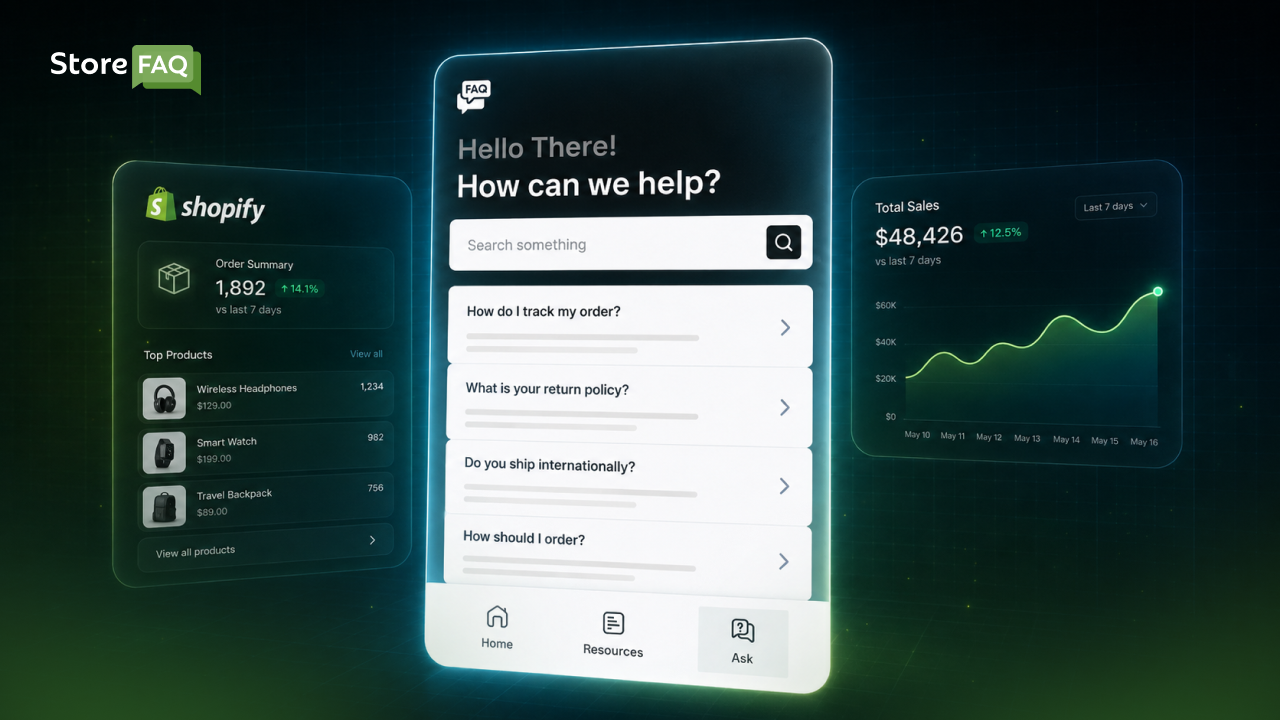
An instant answer feature changes all of that. It delivers the right information at the right moment, without any friction. This is why more and more Shopify merchants are making Shopify customer experience tools, such as instant answers, a core part of their growth strategy. So, what is a Shopify instant answer app, and why does your store need one?
TL;DR (Too Long, Didn’t Read?)
| Benefits | What It Means for Your Store |
| Reduce cart abandonment on Shopify Real-time answers stop hesitation at the point of purchase | Unanswered pre-checkout questions are a leading cause of lost revenue |
| How to reduce support tickets on Shopify Helpdesk automation handles repetitive queries 24/7 | Fewer tickets means lower operational cost and a faster-scaling store |
| Self-service support for eCommerce stores 67% of shoppers prefer finding answers without contacting support | Gives customers control, builds confidence, and reduces friction |
| Choosing the right real-time support tool for Shopify Instant answer app vs. AI chatbot vs. Shopify Inbox compared | Know which app or tool fits your store size, budget, and support volume |
| Real-time FAQ Shopify for SEO Growth Structured FAQ content targets featured snippets and long-tail queries | On-page Q&A signals topical authority and improves organic rankings |
| How to set up a Shopify instant answer app StoreFAQ setup walkthrough, no coding required | Step-by-step configuration from install to live deployment |
Read on to learn in detail about exactly why your Shopify store needs an instant answer feature today.
What Is a Shopify Instant Answer App and How Does It Work?
A Shopify instant answer app is a tool that automatically responds to customer questions in real time. It works directly on your storefront, often through a smart FAQ widget, a floating Q&A panel, or an inline question box. When a visitor types a question, the system matches it with pre-set answers and displays the most relevant one instantly.
This is different from a traditional FAQ page. A standard FAQ page requires the customer to leave the product page, navigate to a separate URL, scroll through a long list, and hope they find something useful. A Shopify instant answer app does the opposite. It brings the answers to where the customer already is.
This is the foundation of self-service support in eCommerce. Instead of routing every question through a helpdesk or live agent, your store handles common queries automatically, creating a conversational commerce experience that feels natural and fast.
Think of it as a self-service support system that never sleeps, never goes on break, and never makes the customer wait.
How Unanswered Customer Questions Impact Your Shopify Growth
Customer questions are not just support tickets. They are buying signals. When someone asks, “Is this product available in XL?” or “How long does shipping take to Canada?”, they are telling you they are close to making a purchase. They just need a little reassurance.
According to a Forrester Research report, 44% of online consumers say that having their questions answered by a live person in the middle of a purchase is one of the most important features a website can offer. But live support is expensive, and it does not scale well for small- to mid-sized Shopify merchants.
A real-time FAQ on your Shopify store bridges that gap. It gives customers the confidence of getting a real response without requiring your team to be online around the clock. It is also one of the most effective ways to reduce support tickets on Shopify without adding headcount.
Here are a few key reasons why unanswered questions hurt your store:
- Cart abandonment increases: When buyers cannot find the information they need, they leave. The Baymard Institute reports that the average cart abandonment rate is nearly 70.19%, and confusion or uncertainty about a product is a major driver.
- Support tickets pile up: Repetitive questions flood your inbox and eat up your team’s time.
- Trust takes a hit: A store that cannot answer basic questions feels unreliable to first-time visitors.
How an Instant Answer App on Shopify Improves the Shopping Experience
The Shopify shopping experience is everything in eCommerce. A clean, fast, and helpful store converts better than a confusing one, regardless of price. Instant answers improve the shopping experience in three specific ways and lead to better Shopify growth.
1. Speed
Speed matters more than most store owners realize. A customer who gets an answer in two seconds is far more likely to buy than one who waits two minutes. Instant answers remove the delay entirely. There is no loading screen, no ticket submission, and no waiting for a reply.
2. Context
Traditional FAQ pages are generic. Instant answers can be tied to specific products, categories, or pages. A customer viewing a leather jacket can get answers about leather care, sizing, and return policy right there on that product page. The answer is always relevant to what the customer is looking at.
3. Self-Service Confidence
Modern shoppers prefer to find answers on their own. A 2022 Zendesk report found that 67% of customers prefer self-service over speaking to a company representative. Self-service support in eCommerce is no longer optional. It is an expectation. While tools like Shopify Inbox handle live messaging, a dedicated instant answer app handles the high volume of repetitive questions automatically, so your team is free to focus on conversations that actually need a human.
How Adding Instant Answers to Your Shopify Store Benefits Your Business
Beyond the customer experience, instant answers deliver real, measurable business results, such as
Reduce Cart Abandonment And Increase Conversion Rates
When a customer has a question right before checking out, a missing answer can cost you the sale. Instant answers keep shoppers on the page and moving toward purchase. By resolving doubt quickly, you remove one of the biggest barriers to conversion, which is cart abandonment.
Stores that implement on-page FAQ or instant answer tools consistently report fewer drop-offs at the product and cart stages. The customer feels informed and confident, and that confidence converts into revenue.
Build Stronger Customer Trust And Brand Credibility
A store that answers questions proactively feels more professional. Shoppers are naturally skeptical about online purchases, especially from stores they have never bought from before. When they can ask a question and get an immediate, clear answer, their trust in your brand grows fast.
Trust is not just a soft metric. It directly affects purchase decisions. A store that feels trustworthy gets more first-time buyers, more repeat customers, and more word-of-mouth referrals.
Reduce Support Tickets on Shopify with Helpdesk Automation
Every question your instant answer tool handles is one fewer email, chat, or call your support team receives. If your store gets 200 repetitive questions per month and your support cost per ticket is even $5, that is $1,000 in savings every single month just from automating common answers.
Scaling a Shopify store becomes much more manageable when your support system scales with it automatically.
Shopify Instant Answer App vs. AI Chatbot vs. Live Chat: What Is the Difference?
This is a question many Shopify merchants ask before choosing the app or tool they need. Here is a quick breakdown.
An AI chatbot uses machine learning to generate dynamic responses to open-ended questions. It can handle complex conversations but often requires significant setup, training data, and ongoing maintenance. For small to mid-sized stores, the cost and complexity may not be justified.
Live chat tools like Shopify Inbox are excellent for real-time human conversations. However, they depend entirely on agent availability. Outside business hours, customers are left waiting.
A Shopify instant answer app sits in the spot where you require it. It uses pre-written, merchant-controlled answers to handle the most common questions instantly, 24/7, with no AI unpredictability and no human dependency. It is predictable, fast, on-brand, and easy to manage.
For most Shopify stores, a dedicated instant answer app handles the majority of customer queries without the overhead of an AI chatbot or the staffing cost of full-time live chat. However, a combination of these can lead to a better experience.
If you want a solution that combines all these features, you can use StoreFAQ. It is a dedicated AI-powered Shopify FAQ app that provides instant answers and live chat, and, very soon, a powerful AI Chatbot feature will add more to this all-in-one AI FAQ app.
StoreFAQ: A Powerful Shopify FAQ App with Instant Answer
If you are looking for a practical and easy-to-use solution, StoreFAQ is worth your full attention. It is a dedicated FAQ builder app designed specifically for Shopify stores, and it comes with an instant answer feature that puts real-time Q&A directly on your storefront.
StoreFAQ is not just a basic FAQ creator. It is built with the modern Shopify merchant in mind. You can create product-specific FAQs, category-based FAQs, and store-wide FAQ sections, all from a simple, intuitive dashboard. No coding is required.
The instant answer feature is one of those features where StoreFAQ really stands out. When a customer has a question, a clean, visible Q&A widget appears on the page. The customer types their question, and the system matches it to the most relevant pre-written answer immediately. There is no page reload, no redirect, and no wait time. Key features of StoreFAQ’s Instant Answer include,
- Real-time answer matching: The toolbar finds and displays the best matching answer as the customer types.
- Product-page integration: You can add the instant answer toolbar to any page of your Shopify store.
- Customizable design: The feature matches your store’s branding, so it feels native and not like a third-party addon.
- Easy setup: You do not need heavy coding skills to set up this feature, so you can easily configure it.
Shopify store owners who add StoreFAQ report fewer support emails, better customer feedback, and smoother checkout flows. The app handles the most common questions automatically, freeing up the team to focus on complex customer needs that actually require human attention.
For growing Shopify brands that want to deliver a premium customer experience without hiring a large support team, StoreFAQ’s instant answer feature is a practical and cost-effective solution.
How to Set Up an Instant Answer for Your Shopify Store?
With StoreFAQ, you can configure Shopify instant answers easily. This is a chat-like feature so that customers can quickly discover the article they are looking for.
You can add this to any page you like, relieving the pressure on your support. Users can even leave you a message and contact you using the ‘Feedback form‘. Learn how to add instant answers in Shopify using StoreFAQ.
Follow the easy steps to add and configure Instant Answers with StoreFAQ for Shopify. Before you start, make sure you have the StoreFAQ app installed on your Shopify store.
Step 1: Enable StoreFAQ Instant Answers For Shopify
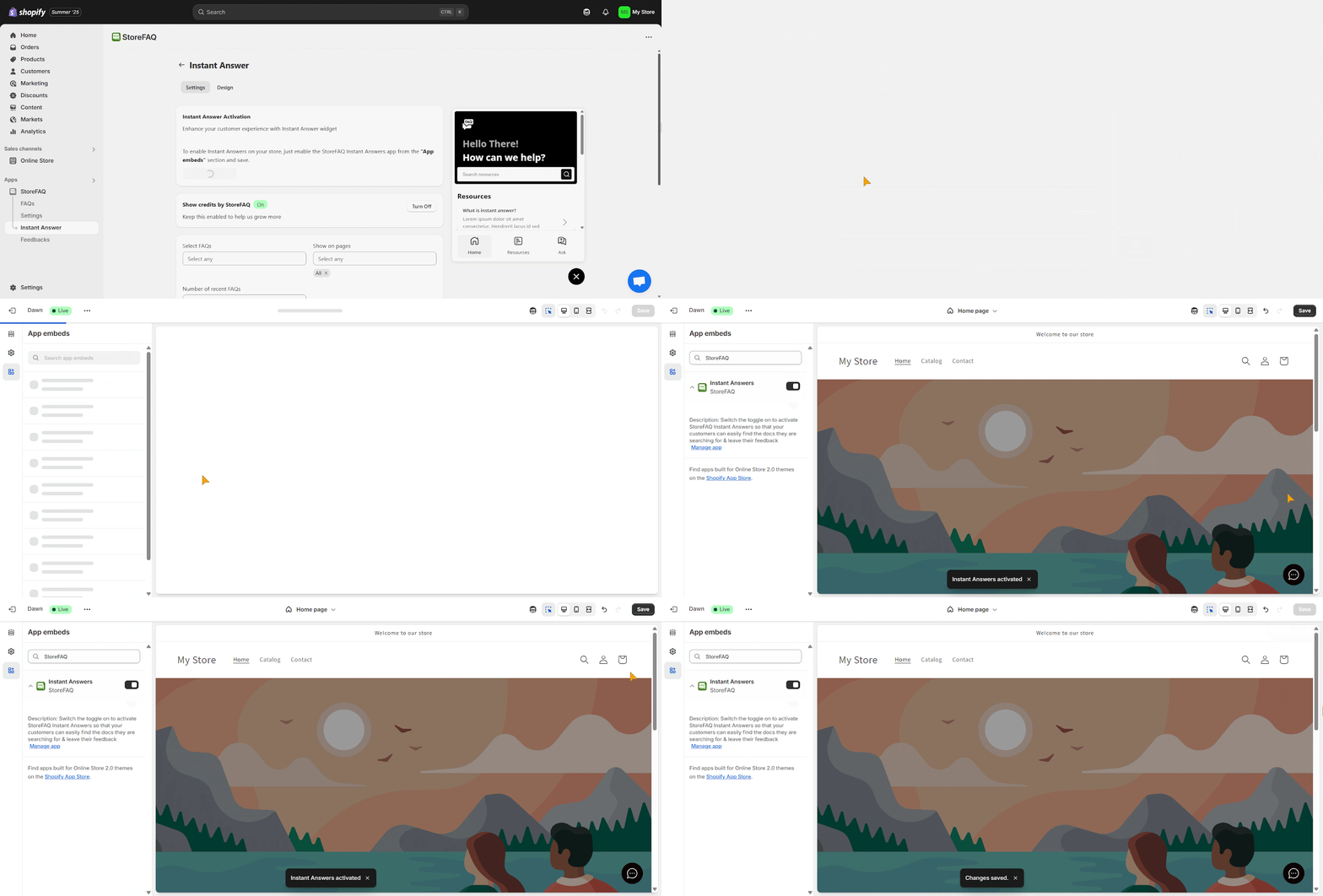
To enable the StoreFAQ Instant Answer feature from your Shopify dashboard, go to ‘StoreFAQ’ from the left sidebar. Then, click on the ‘Instant Answer’ button.
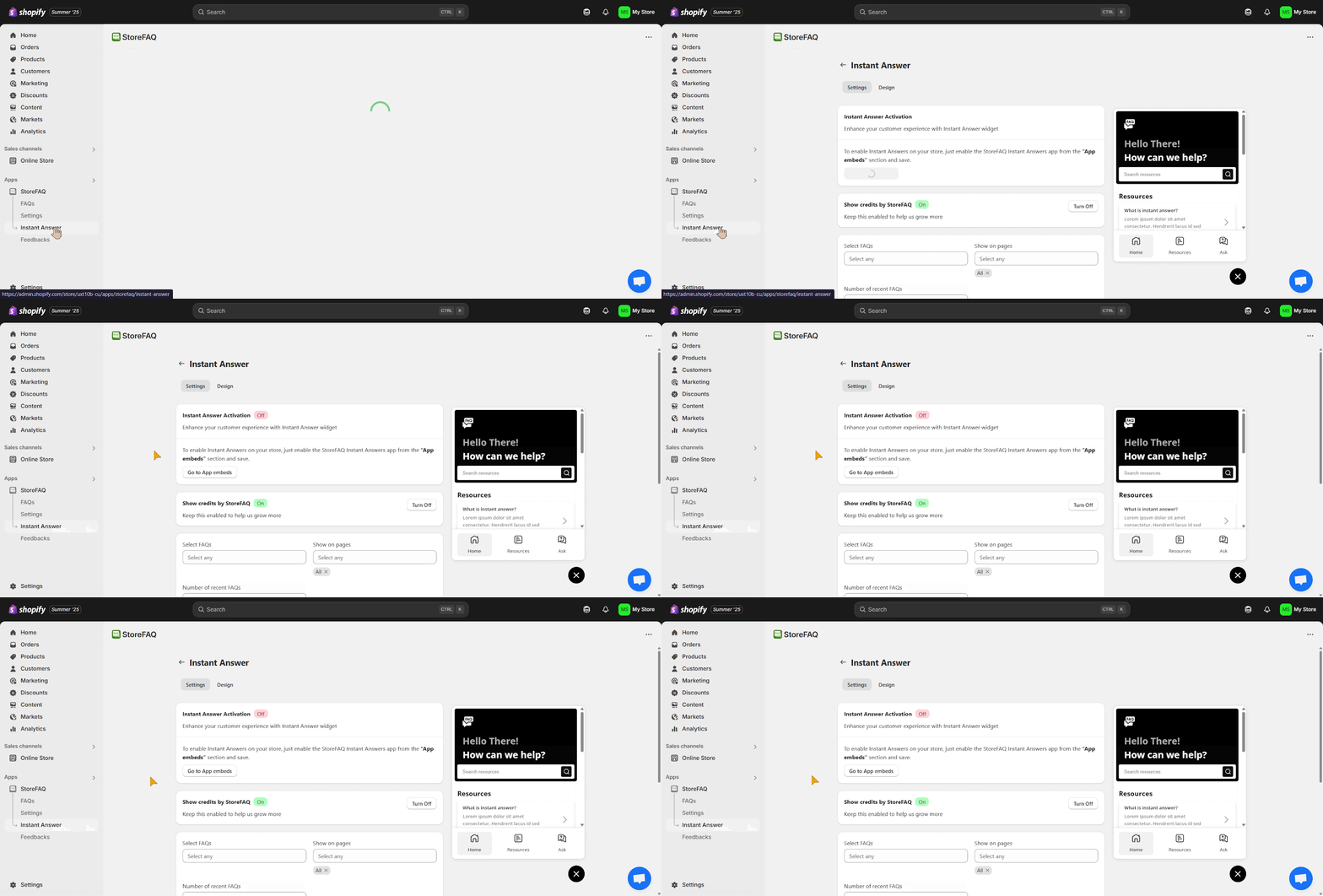
To use the instant answers on your store, hit the ‘Go to App embeds’ button. This will take you to another page where you need to enable the ‘StoreFAQ Instant Answers’ app and click on the ‘Save’ button.
Step 2: Configure The Settings
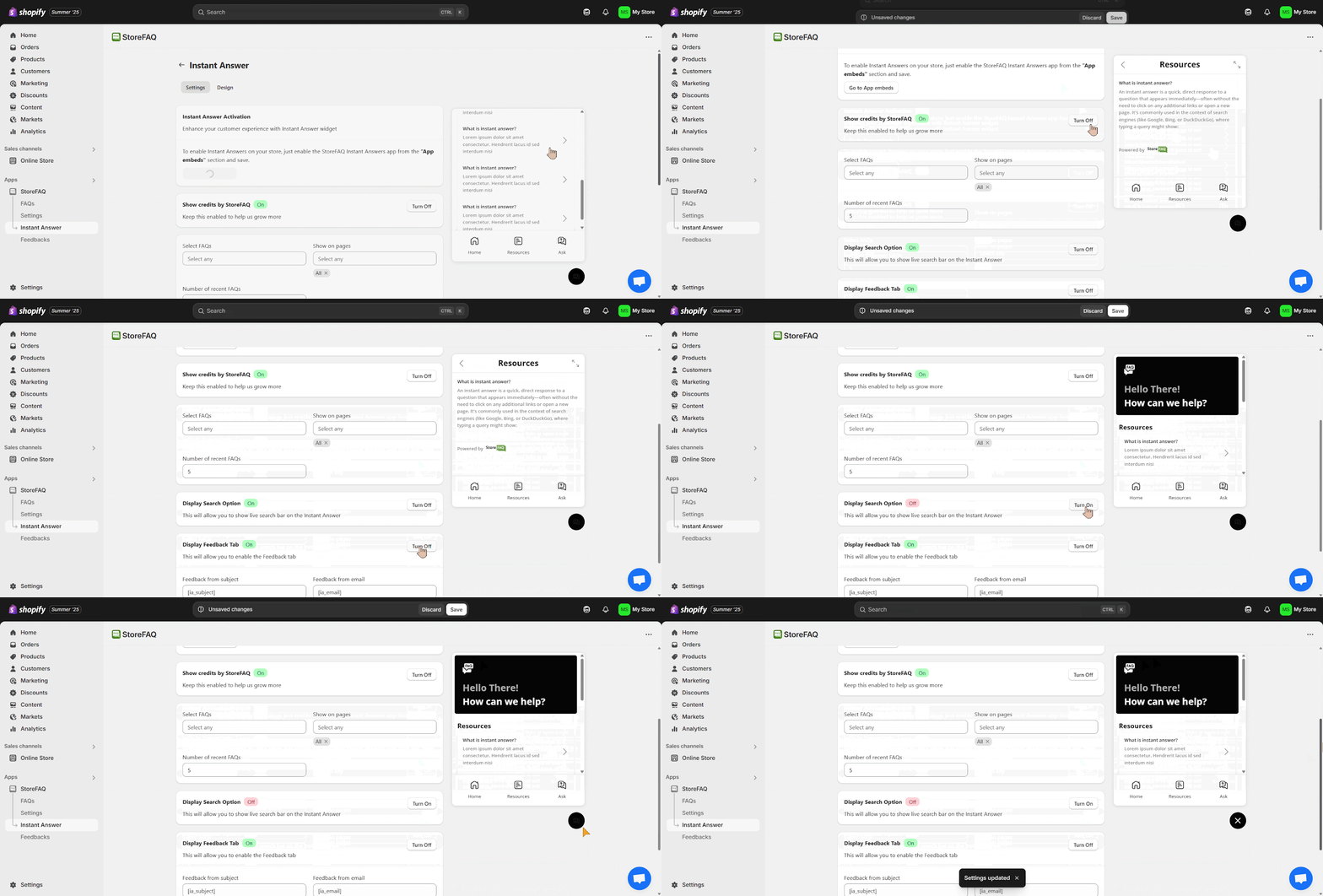
Now, configure ‘Settings‘ for Instant Answer. You can enable or disable various options, namely ‘Show credits by StoreFAQ,’ ‘Display FAQs,‘ ‘Display Search Option,‘ ‘Display Feedback’ tab, etc. Click on the ‘Save’ button when you are done.
Step 3: Design The Instant Answer Toolbar
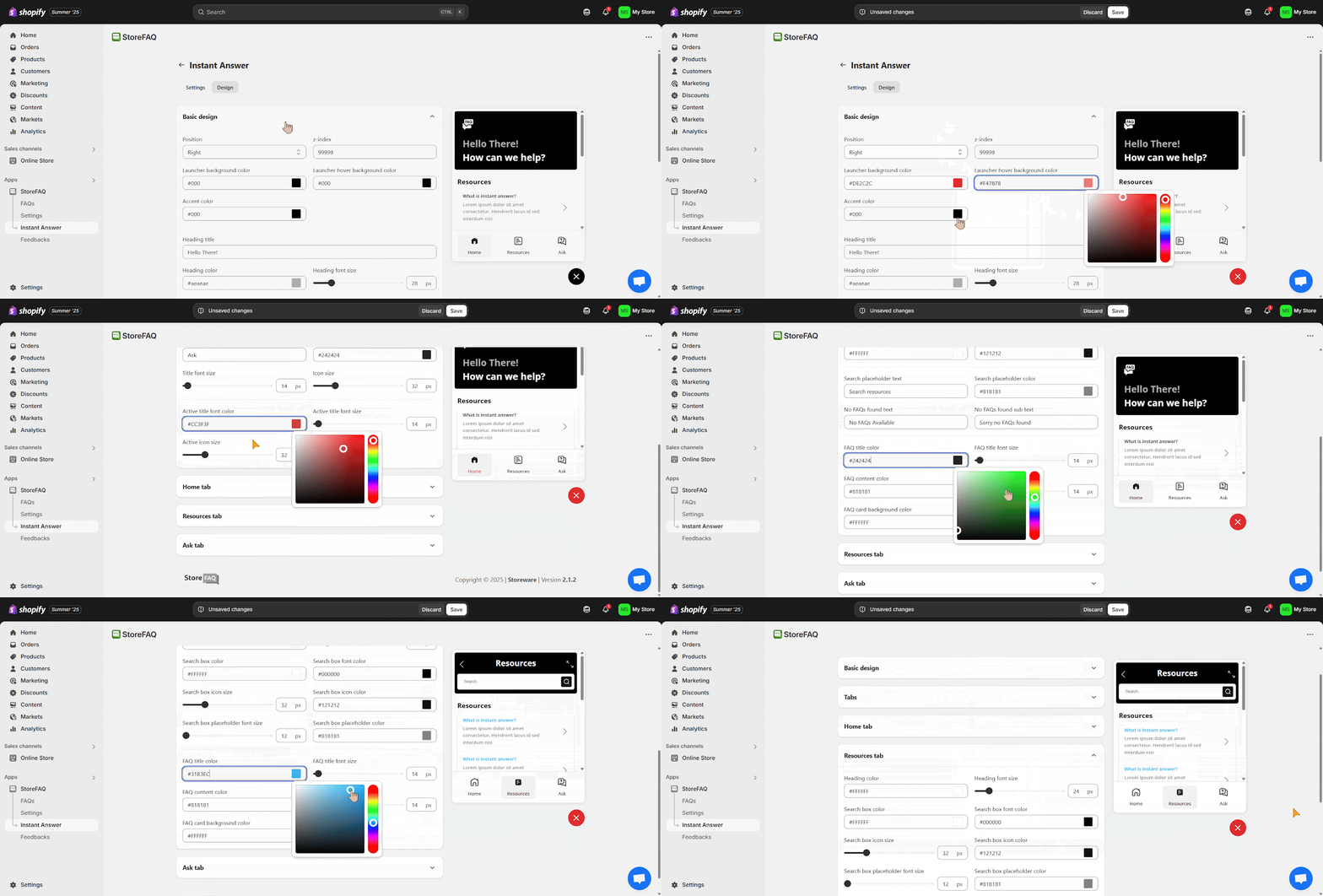
Once you have completed the previous step, design your Instant Answer. You can design a variety of options, namely ‘Basic Design,’ ‘Tabs,’ ‘Home’ tab, ‘Resources’ tab, and ‘Ask’ tab. You can customize multiple font sizes, colors, and text options here. Click on the ‘Save’ button to save all the changes.
By following all the simple steps above, you will be able to configure and display ‘Instant Answer’ on your Shopify website using StoreFAQ.
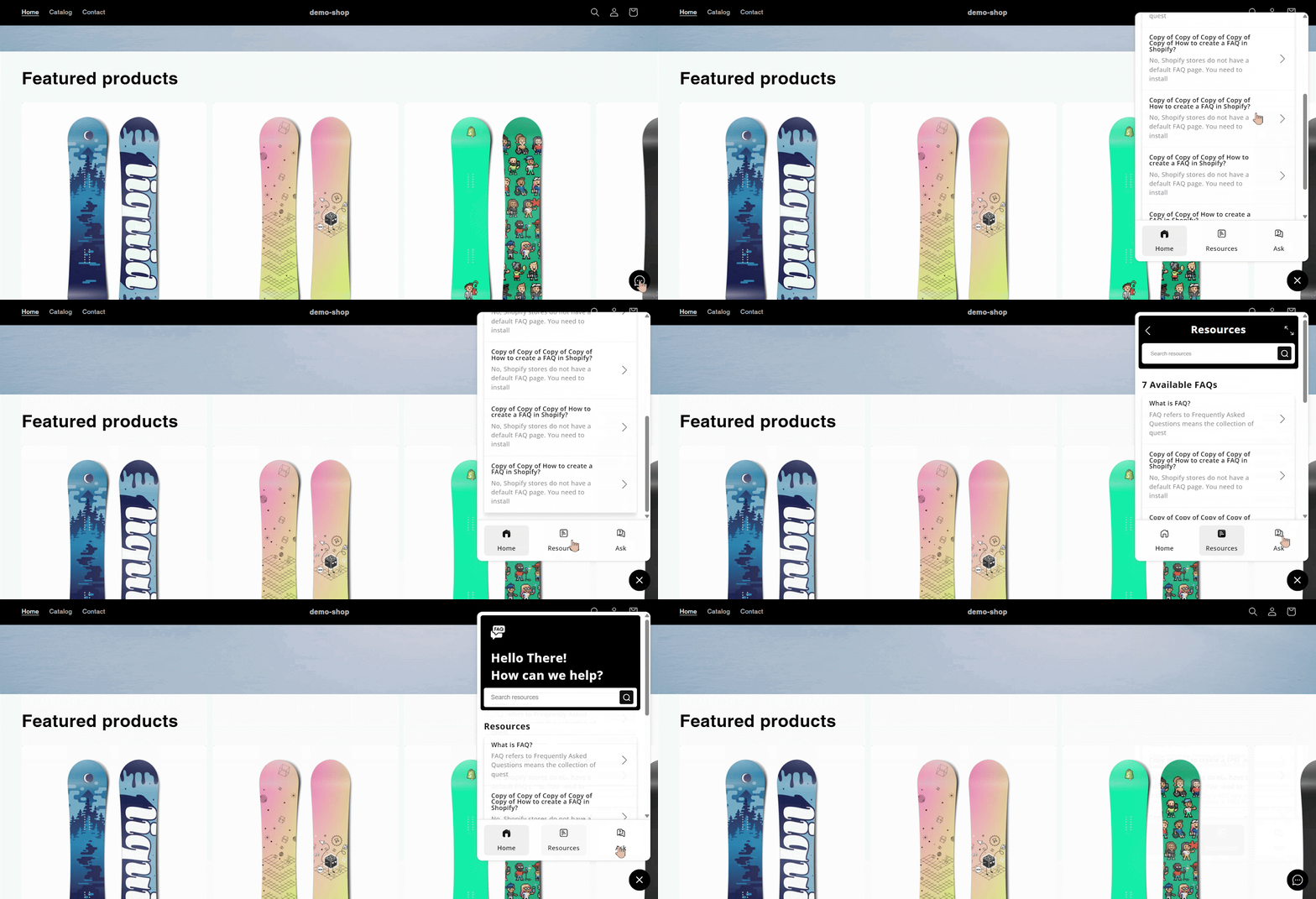
This is how easily you can add and configure Instant Answers on StoreFAQ for Shopify, ensuring better support. Need help? Feel free to contact our dedicated support team.
Common Mistakes Shopify Stores Make Without an Instant Answer App
Many store owners realize too late that their current setup is creating friction. Here are the most common mistakes:
- Relying only on a static FAQ page: Static pages are helpful, but they are not always visible where it counts. If a customer has to leave the product page to find an answer, there are chances that they will not come back.
- Using only live chat. Live chat works great, but it is dependent on human availability. Outside business hours, customers get nothing. Instant answers work 24/7.
- Hiding support links in the footer. Customers do not scroll to footers when they have urgent questions. Putting your FAQ or contact link where no one looks is as good as not having it at all.
- Treating support as reactive. Waiting for customers to submit a ticket means the damage is already done. They may have already left. Instant answers are proactive, addressing questions before frustration builds.
Increase Shopify Conversion Rate with Instant Answer for Your Customers
Online shoppers expect fast answers, and they expect them now. If your Shopify store cannot deliver, you will keep losing customers to stores that can. An instant answer feature is no longer a luxury. It is a fundamental part of a high-converting, customer-friendly online store.
The benefits are clear: lower cart abandonment, fewer support tickets, stronger trust, and better SEO. Tools like StoreFAQ make it simple to implement this feature without any technical expertise. You can have a fully functional instant answer system running on your store in a matter of hours.
Your customers are already asking questions. The only question left is whether your store is ready to answer them. Was this blog helpful for you? If you found this blog useful, you can subscribe to our blog to get more articles like this.